A single table to track, compare, and edit product listings across Shopify, Shopee, and internal sheets.


Ecommerce teams often manage the same product across several systems. A listing may exist in Shopify, Shopee, an internal spreadsheet, a warehouse system, and a planning document used by merchandising or operations. When titles, SKUs, prices, inventory counts, images, and status fields do not match, teams waste time switching tabs and fixing avoidable errors.
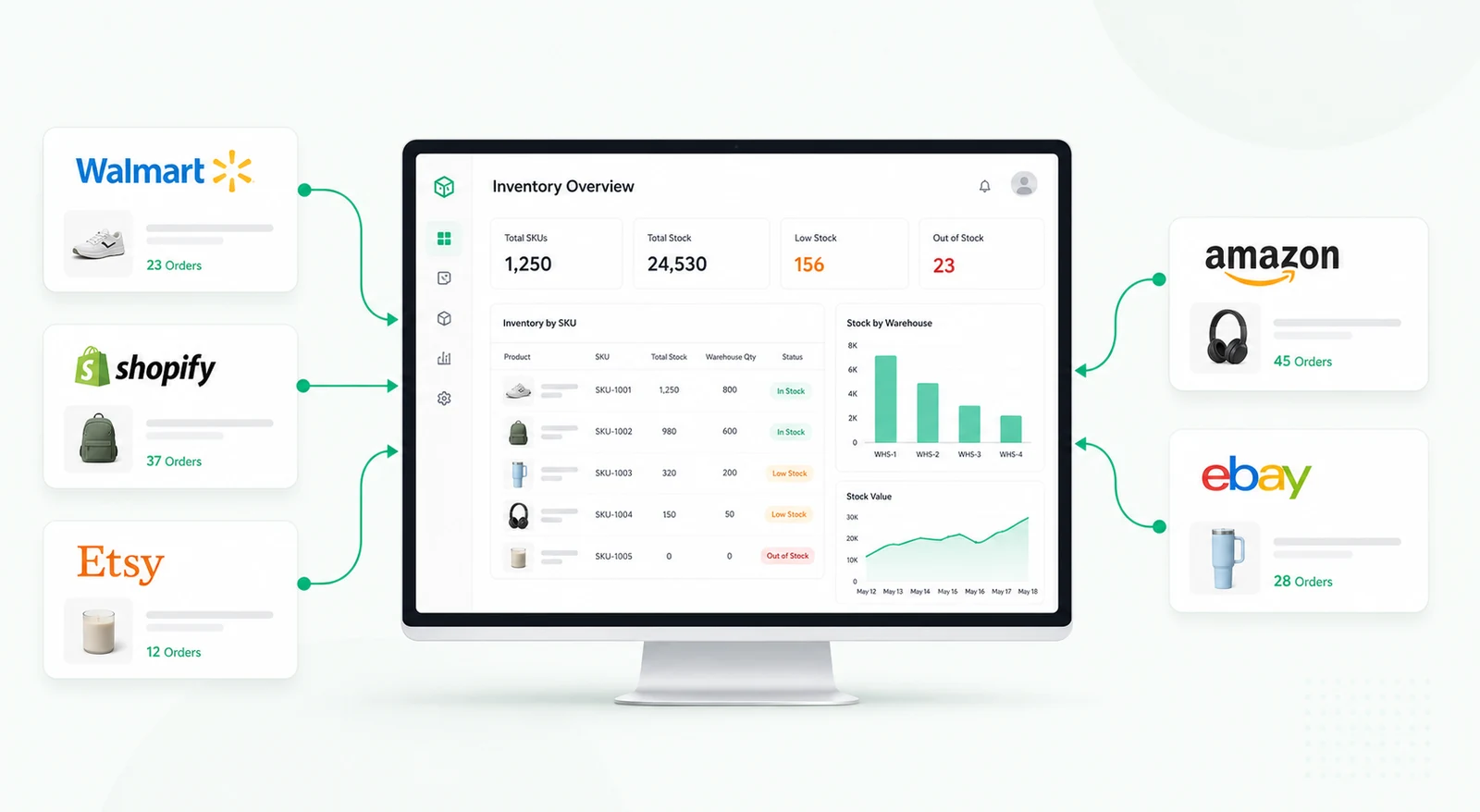
A product dashboard gives ecommerce operators one place to compare, edit, and monitor product records across channels. It does not replace Shopify, Shopee, or the inventory system. It acts as an internal control panel where teams can spot mismatches, prepare updates, and push approved changes through connected APIs where available.
The workflow starts by pulling product data from the connected channels and internal planning source. Each row can represent a product or SKU with fields such as product name, SKU, channel, price, inventory count, category, status, image status, last synced time, and error flags. The dashboard can normalize this data so users can compare records that come from different formats.
Users can filter by marketplace, missing SKU, low stock, price mismatch, unpublished listing, category, supplier, or last update date. This helps operations teams focus on the records that are most likely to create sales, fulfillment, or reporting problems.
Overselling, stale prices, and incomplete listings can create support tickets and lost revenue. The dashboard can highlight differences between Shopify, Shopee, and internal stock planning data. For example, a product may be active on one channel, hidden on another, or show a different inventory count than the planning sheet.
Teams can use editable fields to correct internal records, prepare marketplace updates, or mark a listing for review. Where the marketplace API allows it, Retool can push approved changes directly. Where updates require manual review, the dashboard can generate an action queue instead.
Some product fields should not be changed without review. Price, promotional status, channel visibility, and inventory adjustments may need approval from merchandising, finance, or operations. A product dashboard can support a controlled review workflow where users submit proposed changes, reviewers approve or reject them, and every decision is logged.
For teams managing many SKUs, bulk actions can save time, but they should include validation and confirmation steps. The tool can check for missing required fields, invalid prices, negative inventory, duplicate SKUs, or incomplete product data before changes are submitted.
Automated alerts can notify teams when inventory drops below a threshold, a product is missing required data, a sync fails, or channel data no longer matches the internal source. Exception queues can group products by problem type, such as missing price, stock mismatch, duplicate SKU, unpublished product, or image issue.
These alerts help teams move from periodic cleanup to continuous product operations. Instead of discovering errors after customers complain, the team can review exceptions before they affect sales or fulfillment.
Retool can connect to Shopify, Shopee, Google Sheets, databases, and internal APIs when access is available. Queries can fetch product records, transformers can normalize data, and tables can make rows editable with validations.
Buttons, forms, modals, and workflows can support update approvals, API syncs, bulk actions, alerts, and activity logs. Permissions can separate users who can view products, propose edits, approve changes, or push updates to live channels.
It is an internal tool for reviewing, comparing, and updating product records across ecommerce channels and internal planning systems.
Yes, Retool can connect to Shopify, Shopee, and other systems when API access and permissions are available.
Yes. Editable tables and forms can support product updates, but sensitive changes should include validation and approval steps.
It can help identify stock mismatches and low inventory earlier. Actual prevention depends on the connected inventory source and sync rules.
Yes. Bulk updates can be built with confirmation, validation, and permission checks to reduce the risk of accidental changes.
Yes. Fields, channels, sync logic, approval rules, exception types, and permissions can be adapted to each ecommerce operation.
For a related retail operations workflow, explore the inventory shrinkage dashboard, or request a custom Retool build.
We're officially approved by Retool and proud to be an agency partner!

Visit our blog to learn more about our innovative approaches to solving complex challenges.