Maya Tran
April 26, 2026
•
6 min
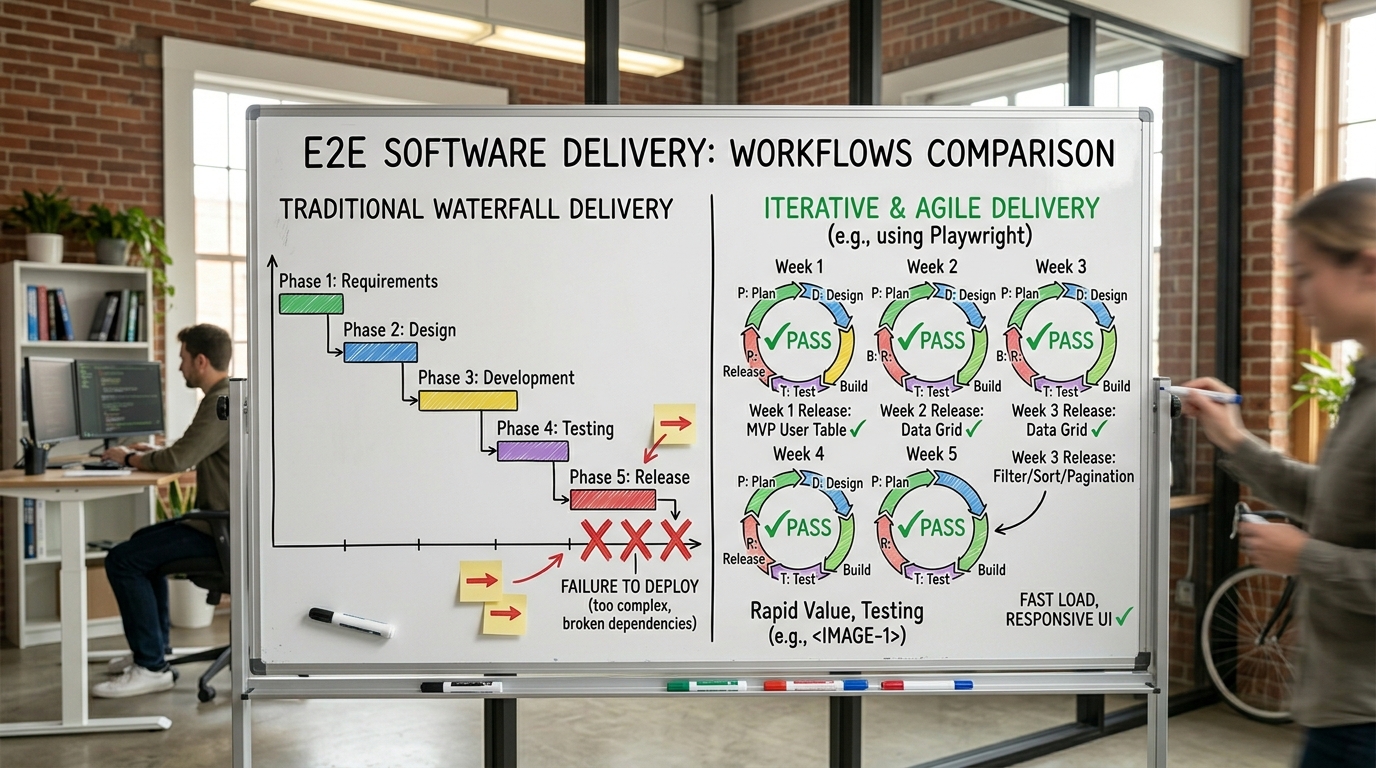
Most internal tool projects die the same death: a three-month spec, a six-week build, and a demo that lands with a thud because the ops team needed something completely different. The problem isn't execution — it's the assumption that you can define the right solution before you've built anything.
Iterative and incremental delivery is the antidote. Not the watered-down agile-ceremony version your last consultant sold you, but the real thing: shipping something working in week one, learning from it, and compounding that learning into every release after. This post breaks down how to actually do that — specifically when you're building internal dashboards, portals, and tooling on stacks like Retool and Supabase.
These two words get used interchangeably. They're not the same thing, and conflating them causes real problems in how teams plan and deliver.
Incremental means building in pieces. You add functionality chunk by chunk until the whole thing exists. Each chunk is a slice of the final product. Iterative means building a rough version and refining it. You start with something that works — badly — and improve it through feedback cycles.
The best teams do both simultaneously. Ship a rough version of a feature (iterative), then expand its scope over multiple releases (incremental). A customer support portal might launch with just ticket lookup in week one, then add status updates in week two, then bulk actions in week three. Each release is also being refined based on how support reps actually use it.
If you're only doing incremental, you might build the wrong thing perfectly. If you're only doing iterative, you never grow the product's scope. You need both loops running at the same time.
Internal tools are uniquely well-suited to iterative and incremental delivery — and most teams completely waste this advantage.
Your users are accessible. They sit in the same building or Slack workspace. You can walk over, watch them use the tool for ten minutes, and learn more than you'd get from a month of external user research. Feedback cycles that take weeks with consumer products take hours internally.
The stakes for imperfection are lower. If your internal ops dashboard has a rough edge on day one, your ops lead will tell you. Nobody's churning. Nobody's posting a bad review. You have room to ship something that's 70% right, learn, and fix it by next week.
There's also no marketing layer to navigate. You don't have to convince anyone to try it — you're deploying it to people who need it. Adoption feedback is immediate and honest.
This is exactly why building internal tooling on low-code platforms like Retool makes sense. The platform handles the scaffolding so your iteration cycles are about logic and UX, not boilerplate infrastructure.
Forget sprints as a unit of ceremony. Think of them as a unit of learning. Here's a cadence that works for most internal tool builds:
.jpg)
The compounding effect here is real. By week eight, you have a tool that's been through four feedback cycles. It fits the workflow like something custom-built over six months — because, in a way, it was.
The most common failure mode isn't technical. It's organizational. Teams start strong with week-one momentum, then slow to a crawl because feedback loops collapse.
Here's what actually kills iterative delivery on internal tooling projects:

Most of these problems are solved by keeping the feedback loop short and the decision-making centralized. One user. One decision-maker. One priority per cycle.
The Retool and Supabase stack is purpose-built for this kind of delivery model. Here's how to take advantage of it.
Start with a Supabase table that mirrors your core data entity — orders, tickets, users, whatever the tool is about. Connect it to a Retool table component. That's your week-one deliverable. It sounds almost too simple, but it gives users something real to react to instead of a mockup.
Use Supabase Row Level Security from the start. Don't bolt it on later. It's much easier to iterate on a secure foundation than to retrofit permissions after users have formed habits around open access.
In Retool, lean on modules and custom components to keep things reusable as the scope grows incrementally. If you build a status badge component in week two, you want to reuse it across five screens by week six — not rebuild a variation of it each time.
Supabase's Realtime feature is worth turning on early if your tool involves live data — inventory, support queues, order status. Users notice when data is stale. Realtime updates remove a whole category of "why isn't this refreshing?" feedback before it surfaces.
Set up Supabase database functions for any business logic that's likely to evolve. Keeping logic in the database rather than hardcoded in Retool queries makes it faster to iterate on behavior without touching the UI layer.
The teams that build the best internal tooling aren't the ones with the best upfront plans. They're the ones with the shortest feedback loops and the discipline to act on what they learn.
Every week you spend speccing instead of shipping is a week you're not learning. Every feature you build without user contact is a bet you might be wrong about. The math strongly favors getting something in front of real users as fast as possible, then compounding the learning from there.
Internal tools give you every advantage to do this well — accessible users, lower stakes, fast deployment paths, and platforms like Retool and Supabase that remove the infrastructure friction. The only thing standing between you and a tool your team actually loves is the willingness to ship before it's perfect and listen to what happens next.
Looking to supercharge your operations? We’re masters in Retool and experts at building internal tools, dashboards, admin panels, and portals that scale with your business. Let’s turn your ideas into powerful tools that drive real impact.
Curious how we’ve done it for others? Explore our Use Cases to see real-world examples, or check out Our Work to discover how we’ve helped teams like yours streamline operations and unlock growth.

Before we quote, we help you clarify the workflow. Share your idea, process, or existing tools, and we’ll map the key requirements, suggest the right system, and create a free wireframe so you can see the solution before development starts.