Maya Tran
May 5, 2026
•
6 min

You build a Retool app, wire up a query against a large dataset, hit run — and Retool kills it after 30 seconds with a timeout error. Your database is fine. Your query is fine. Retool just gave up. This is one of the most common pain points we see with internal tools that grow beyond simple CRUD: reports that aggregate millions of rows, batch jobs triggered from a portal, compliance exports that join five tables. The default timeout isn't built for any of that.
This post covers exactly what's happening under the hood when Retool times out a query, the levers you actually have to extend or bypass that limit, and the architectural patterns we use at Retoolers to handle long-running operations without fighting the platform. Whether you're on Retool Cloud or self-hosted, there's a path forward.
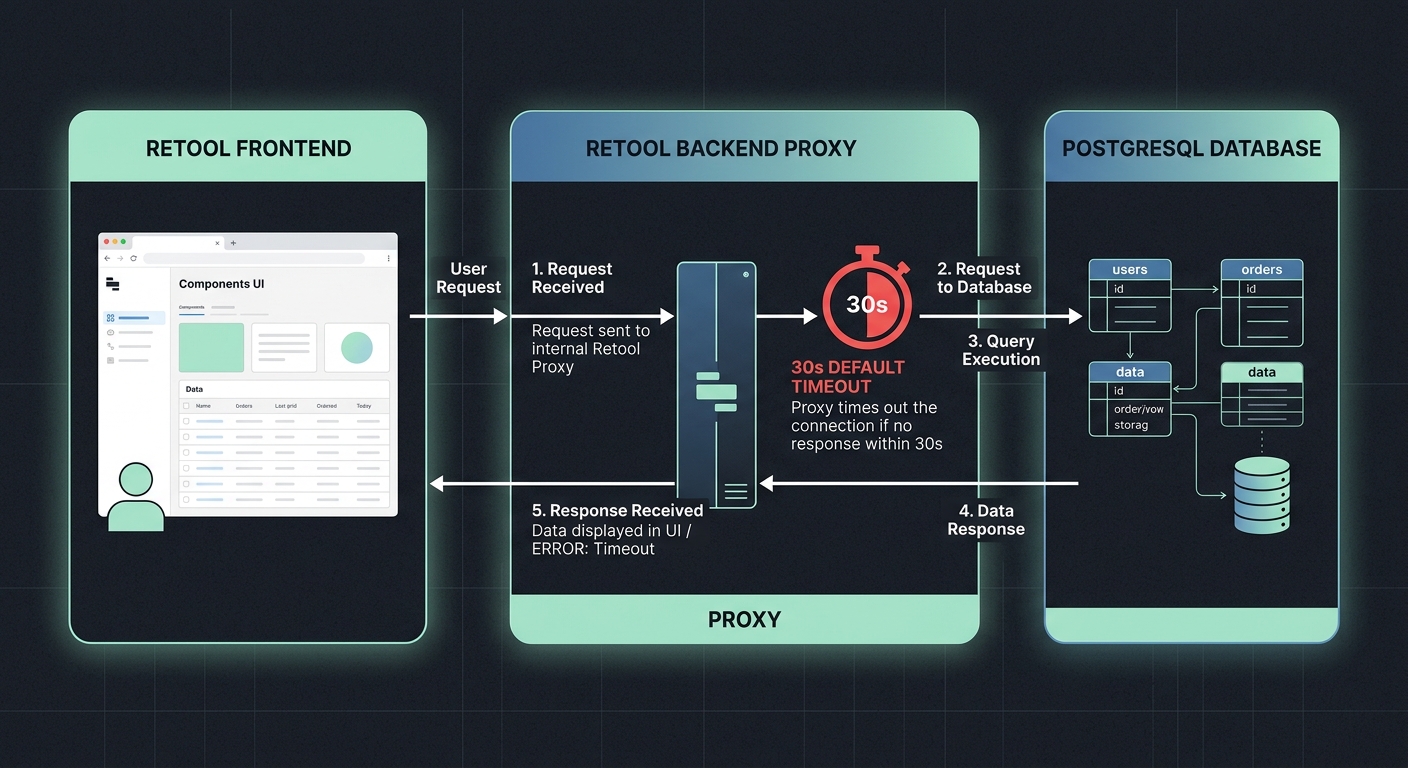
Retool enforces timeouts at two distinct layers, and most people only think about one. The first is the query execution timeout — the hard limit Retool sets on how long it waits for a response from your resource (database, API, etc.). The second is the HTTP connection timeout between the Retool frontend and the backend service that proxies your query.
On Retool Cloud, the default query timeout is 30 seconds. That's not a database limit. That's Retool's own backend dropping the connection and returning an error to the client. Your Postgres instance might still be happily running that query for another two minutes — Retool has just stopped listening.
Self-hosted deployments have the same default, but you can change it. Cloud deployments give you fewer knobs, but there are still workarounds. The fix you reach for depends entirely on which layer is the bottleneck and which deployment model you're running.
In the Retool query editor, every query has a Timeout field under its advanced settings. On Cloud, this caps out at 120 seconds. That covers a lot of use cases, and most people miss it entirely because it's buried in the UI. Set it before you start looking for architectural solutions.
For REST API queries, you're also subject to whatever timeout the third-party API enforces on its end. Retool can't extend that — if the API closes the connection after 30 seconds, Retool will surface that as a timeout regardless of what you've configured.
For database resources — Postgres, MySQL, BigQuery — the Retool timeout is the binding constraint in most cases, not the database's own timeout settings. Raise the Retool query timeout first. If the query is still running past what you've configured and still failing, then start looking at your database's statement_timeout or equivalent setting.
If you're running Retool on your own infrastructure, you have direct access to the environment variables that control this behavior. The relevant setting is DBCONNECTOR_QUERY_TIMEOUT_MS, which sets the global query timeout in milliseconds across all resources.
For Docker Compose deployments, add it to your .env file or directly to the service definition:
DBCONNECTOR_QUERY_TIMEOUT_MS=300000
That sets a 5-minute timeout. You can push this higher, but think carefully before you do — a global timeout of 10+ minutes will mask slow queries that should be optimized, and it creates real UX problems when users are sitting in front of a spinner that might never resolve.
On Kubernetes, patch the environment variable into the api and dbconnector container specs. If you're running the jobs service separately, it has its own timeout configuration. Review your deployment's documented environment variables — they shift between Retool versions, so cross-reference against the version you're actually running.
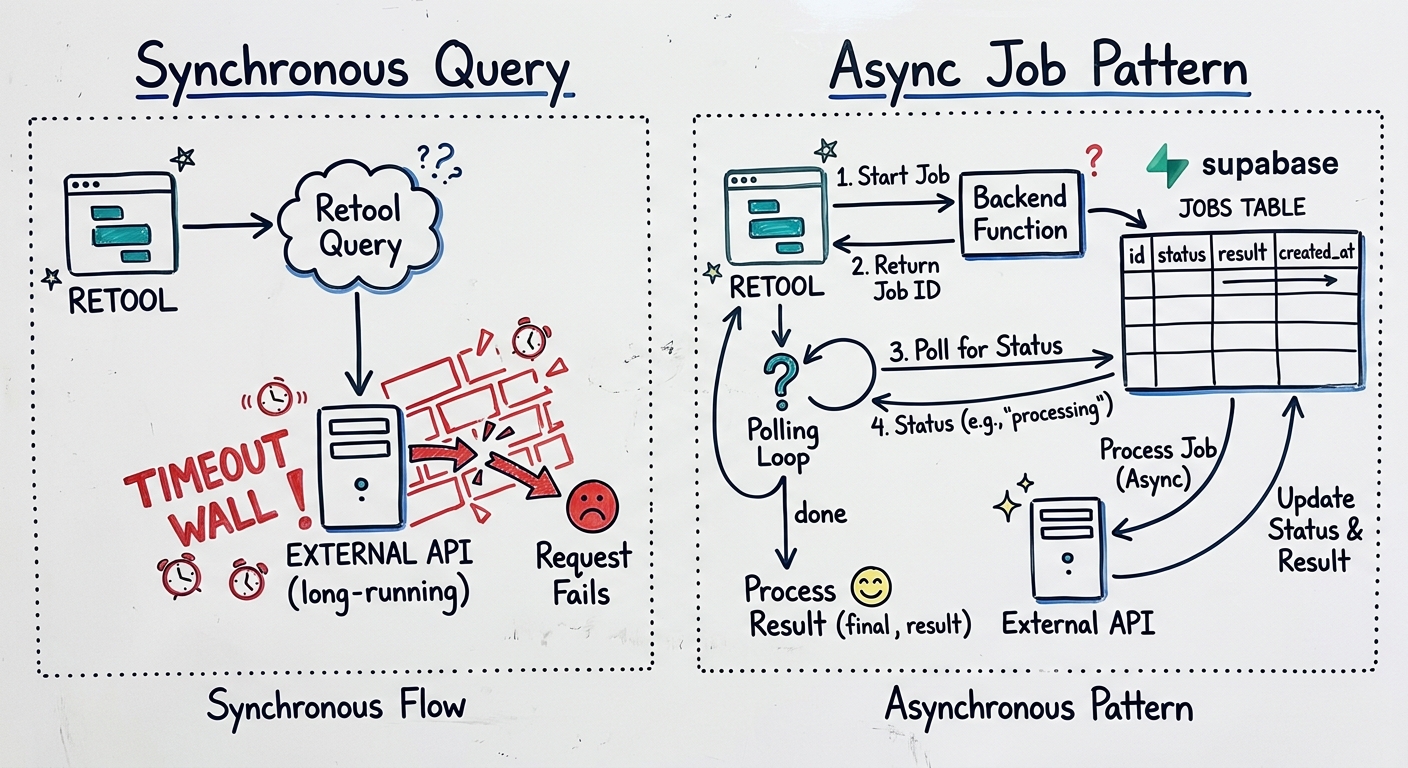
Sometimes the right answer isn't a bigger timeout — it's rearchitecting so Retool never has to wait in the first place. This is the pattern we default to for anything that's genuinely going to run longer than 60 seconds.
The core idea is async job execution: Retool triggers a job and immediately gets back an acknowledgment, then polls for the result. The heavy computation happens out of band.
With Supabase, this is straightforward. You can use pg_cron or Supabase Edge Functions as the execution layer:
For more complex orchestration, a dedicated job queue like Inngest, Trigger.dev, or even a simple SQS queue with a Lambda consumer gives you retry logic, observability, and concurrency control that you'd otherwise have to build yourself.
The Retool side of this pattern is straightforward: a button that fires a mutation query, followed by a JavaScript query set to run on a timer that checks status. When status flips to complete, stop the timer and load results. It's a few extra queries, but it's rock solid compared to hoping a 90-second synchronous query doesn't get killed.
There's a version of this problem where the timeout isn't the issue — the query is. Before you reach for async patterns or extended timeouts, run the query directly against your database and look at the execution plan. A full table scan on 50 million rows without an index isn't a timeout problem. It's a query problem.
Materialized views are underused for this. If you have a compliance report that joins five tables and aggregates two years of transaction data, that report doesn't need to run live. Materialize the result set on a schedule — hourly, nightly, whatever the business actually needs — and have Retool query the materialized view. The query goes from 90 seconds to under a second.
Similarly, if your use case is a bulk export, consider whether Retool is even the right trigger. A backend endpoint that streams a CSV to S3 and emails a download link is a better pattern than a Retool query that tries to load 200,000 rows into the browser. Retool is an internal tool platform, not a data pipeline. Know where that line is.
If you're on Retool Cloud, raise the query-level timeout to 120 seconds first. If that's not enough, move to an async job pattern with polling. If you're on self-hosted Retool, set DBCONNECTOR_QUERY_TIMEOUT_MS to what you actually need and stop there if the query runs in that window. If the operation is genuinely long-running — anything over a minute that users will wait on — go async regardless of your deployment model.
And if you're hitting these limits regularly, that's a signal. Either the queries need optimization, or the workload belongs in a data pipeline rather than an internal tool. Retool is excellent at what it does. Making it run batch ETL jobs is working against the grain of the platform.
Need help implementing the async pattern with Supabase or wiring up a job queue behind a Retool portal? Book a call with Retoolers — reach out.
Looking to supercharge your operations? We’re masters in Retool and experts at building internal tools, dashboards, admin panels, and portals that scale with your business. Let’s turn your ideas into powerful tools that drive real impact.
Curious how we’ve done it for others? Explore our Use Cases to see real-world examples, or check out Our Work to discover how we’ve helped teams like yours streamline operations and unlock growth.
Before we quote, we help you clarify the workflow. Share your idea, process, or existing tools, and we’ll map the key requirements, suggest the right system, and create a free wireframe so you can see the solution before development starts.