Duy Vu
February 11, 2026
•
25 mins read

Retool started as a powerful way to build internal admin panels fast. For many teams, it replaced months of custom dashboard work with days or weeks of configuration. Over time, though, the way companies operate has changed. Vendors need access to order data. Partners need onboarding portals. Clients want self service dashboards instead of emailing support. This is where the question comes up: can Retool handle client portals and public apps, or is it only for internal admin panels?
The reality is that Retool can handle both extremely well. Retool calls these client facing applications external tools. They are designed for users outside your core team, such as customers, vendors, partners, or contractors. When built correctly, they can look polished, perform reliably, and scale safely.
Internal admin panels are apps used by your own team. Think operations dashboards, finance tools, support consoles, or internal analytics. These tools usually assume trusted users, simpler permission models, and dense data heavy interfaces.
Client portals and public apps are different. They are used by third parties who should only see their own data. The UI must be simpler, the permissions stricter, and the experience more branded. Retool supports this distinction through external tool settings, user access controls, and environment level permissions.
At a high level, internal tools optimize for speed and power, while external tools optimize for clarity, safety, and reliability. Retool can support both as long as you design with that difference in mind.
External tools are Retool apps that are shared with users outside your organization. These users do not need full Retool accounts. They authenticate through email, SSO, or magic links and are restricted to specific apps and data.
External tools are ideal for client portals, partner dashboards, vendor management systems, and lightweight public facing workflows. You still build them using the same Retool editor, components, and data sources, but the access model and UX goals change significantly.
This is one of Retool’s biggest strengths. You can reuse your backend logic, APIs, and databases across both internal and external apps without rebuilding everything from scratch.
Client portals come in many forms, and Retool is flexible enough to support most of them.
A common example is a customer dashboard for a SaaS product. Clients can log in to view usage data, billing history, feature access, or account settings. Instead of building a full frontend app, teams use Retool to connect directly to their production databases and APIs.
Another example is a vendor or supplier portal. Vendors can upload documents, track payments, update inventory, or respond to requests. Retool handles form inputs, file uploads, and workflow approvals cleanly.
Partner portals are also common. These might include deal tracking, onboarding steps, shared analytics, or co marketing assets. Retool makes it easy to gate content by partner ID and role.
Finally, many companies use Retool for operational portals such as booking systems, request management tools, or reporting dashboards shared with select clients.
In SaaS, external tools often act as customer analytics dashboards, feature management panels, or support self service portals. Clients get real time data without needing support tickets.
In fintech, Retool is used for client reporting portals, transaction history dashboards, compliance document submission, and approval workflows. Security and permissions are critical here, and Retool integrates well with role based access control.
In healthcare, providers and partners use Retool portals to manage patient intake data, appointment coordination, and reporting. Retool works well when paired with strong backend validation and audit logging.
In logistics and supply chain, vendors and partners access shipment tracking, inventory levels, and delivery status through external tools. Retool’s real time updates and API integrations are especially valuable here.
In marketplaces, Retool can power seller dashboards, payout tracking, listing management, and performance analytics, all without exposing internal admin complexity.
One of the biggest concerns with client portals is access control. Retool handles this through external user authentication, environment level permissions, and data level filtering.
External users can log in through email based authentication, SSO providers, or magic links. Once authenticated, they only see the apps they are allowed to access.
On the data side, best practice is to filter every query based on the logged in user’s ID, organization ID, or role. Retool makes this easy by exposing user context variables that can be passed directly into queries.
This model ensures that even if many clients use the same app, they only ever see their own data.
While Retool works well for client portals, internal admin panels remain its strongest use case. These tools often include complex tables, bulk actions, advanced filters, and internal only workflows.
Internal tools move faster because they do not need heavy design polish or strict UX constraints. Teams can iterate daily, add features quickly, and break things safely without affecting customers.
The key takeaway is that Retool does not force you to choose one or the other. Many companies run internal admin panels and external client portals side by side, sharing the same data sources and logic.
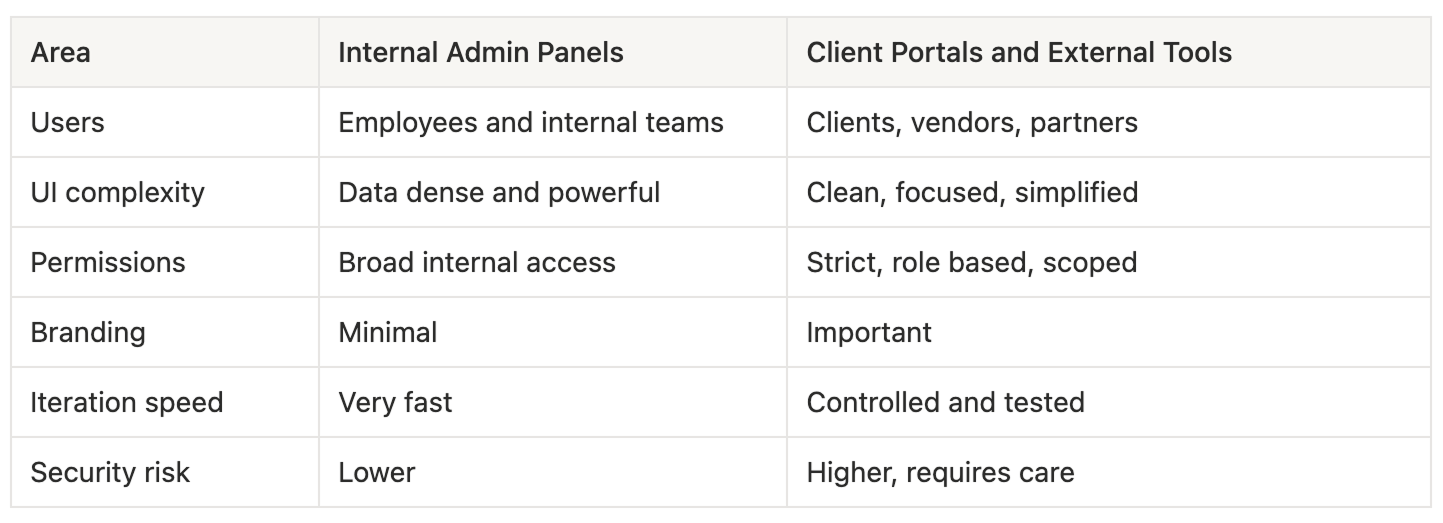
This comparison helps teams decide how to scope their Retool apps correctly from day one.
Retool is powerful, but it is not a full replacement for custom frontends in every scenario. External tools should avoid extremely high traffic public use cases, consumer facing marketing flows, or pixel perfect brand experiences.
Retool also requires careful performance tuning for large datasets and complex queries when exposed to external users. Caching, pagination, and query optimization become more important.
That said, for most B2B client portals and partner tools, these limitations are manageable and well worth the speed gains.
Always design external tools separately from internal ones. Keep layouts simple and task focused. Avoid exposing raw tables unless absolutely necessary.
Implement strict data filtering at the query level. Never rely only on UI hiding for security.
Test external tools with non technical users. What feels obvious to an internal team might be confusing to a client.
Finally, treat client portals as products, not quick hacks. Even though Retool makes them fast to build, they still represent your brand.
Retool is no longer just an internal admin panel builder. With external tools, it can power client portals, partner dashboards, and vendor systems across many industries. When designed thoughtfully, Retool lets teams move faster without sacrificing control, security, or reliability. For many B2B companies, it is the fastest path from internal operations to customer facing value.
If you want, next we can turn this into a use case page, add internal links for SEO, or adapt it into a comparison post versus custom frontend builds. Get a Quote
Looking to supercharge your operations? We’re masters in Retool and experts at building internal tools, dashboards, admin panels, and portals that scale with your business. Let’s turn your ideas into powerful tools that drive real impact.
Curious how we’ve done it for others? Explore our Use Cases to see real-world examples, or check out Our Work to discover how we’ve helped teams like yours streamline operations and unlock growth.

Before we quote, we help you clarify the workflow. Share your idea, process, or existing tools, and we’ll map the key requirements, suggest the right system, and create a free wireframe so you can see the solution before development starts.