Maya Tran
April 26, 2026
•
5 min
Most founders waste six months building a frontend nobody asked for. You hire a React developer, argue about component libraries, and ship a UI that your ops team immediately asks you to change. Meanwhile, your actual product — the logic, the data, the workflows — is sitting there waiting. There's a better path.
This post breaks down how to build a real, production-grade SaaS product without writing a single line of frontend code. We'll cover the stack, the architecture decisions that actually matter, and where the no-code approach breaks down so you can plan around it before it bites you.
Let's be precise. "No-code SaaS" doesn't mean you're avoiding complexity — it means you're not writing frontend code. You still write backend logic. You still design a data model. You still think carefully about auth, permissions, and multi-tenancy. The difference is you're not building a custom React app to sit on top of all that.
What you're doing instead is using a UI layer — in this case Retool — that someone else maintains and evolves. Your job is to wire it to real data and real business logic. That's a meaningful distinction. It means your engineering effort goes into the parts that differentiate your product, not the parts that look like every other SaaS dashboard ever built.
This approach works best for internal tools, ops-heavy products, B2B dashboards, and early-stage SaaS where you're still figuring out what users actually need. It's a worse fit if your product's entire value proposition is the UI itself — design-driven consumer apps don't belong here.
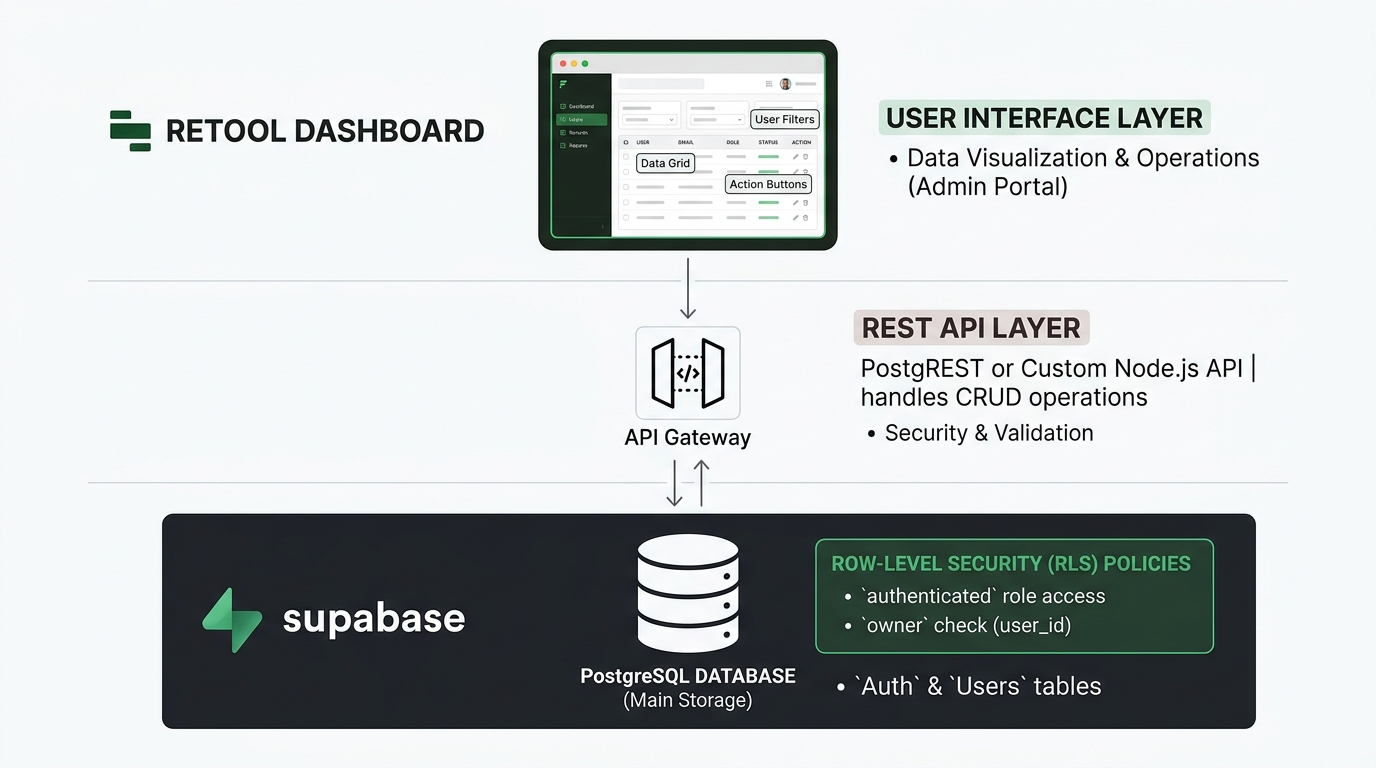
The core of this architecture is simple: Supabase handles your data and backend, Retool handles your UI. Both are production-grade. Both have free tiers that let you validate before you spend anything meaningful.
Supabase gives you a Postgres database, auth with row-level security, storage, and edge functions — all accessible via a REST or GraphQL API out of the box. You're not locked into a proprietary data layer. It's just Postgres, which means you can always migrate out if you need to, and every tool in the ecosystem already knows how to talk to it.
Retool connects directly to Supabase via its built-in Supabase integration or through a standard Postgres connection. You write SQL queries, wire them to table components, forms, and buttons, and handle business logic in Retool's JavaScript query layer. Realistically, you're writing JavaScript — but it's data transformation and event handling, not component architecture.
The practical setup looks like this:

This stack covers a surprising amount of ground. Customer management dashboards, order tracking tools, approval workflows, operations portals — most B2B internal tooling fits cleanly into this model.
The mistake most people make with Retool is building for the demo. Everything works when you have 50 rows in your table and one test user. It falls apart when you have 50,000 rows, three user roles, and a client asking why their data shows up on someone else's screen.
Multi-tenancy is the first thing to design properly. In Supabase, this means row-level security policies that scope every query to the authenticated user's organization. Set this up before you build a single Retool screen. RLS is the right place for this logic — not in Retool's query layer, where it's easier to bypass and harder to audit.
Permissions inside Retool map to your user roles. You can conditionally show and hide components, disable buttons, and restrict which apps users can access based on group membership. Define your roles in Supabase, sync them to Retool's user metadata, and gate components accordingly. It's not as flexible as a fully custom auth system, but it's solid enough for most early-stage products.
Performance requires intentional query design. Don't let Retool components fire unbounded queries against large tables. Use pagination, filter parameters, and indexed columns. Retool's query caching and manual trigger options give you enough control to keep things fast — but you have to use them. Default "run on page load" behavior will hurt you at scale.
.jpg)
There are real limits here, and pretending otherwise sets you up to hit them at the worst possible time.
Complex custom UI. If a user needs drag-and-drop reordering, a rich text editor with specific formatting rules, or a highly interactive canvas, Retool will fight you. You can embed custom React components in Retool, which buys you flexibility — but at that point you're writing frontend code anyway. Know the threshold before you hit it.
Public-facing pages. Retool is built for authenticated internal tools. If your product needs a marketing page, a public dashboard, or an embeddable widget, you need something else. Keep your public-facing layer separate — a static site, a Next.js page, whatever — and reserve Retool for the authenticated product experience.
Real-time requirements at volume. Supabase has real-time subscriptions via Postgres changes, and Retool can poll on intervals. For moderate real-time needs this is fine. For high-frequency data — live trading views, real-time logistics tracking, multiplayer interactions — you'll need to build a proper WebSocket layer or accept the limitations.
White-labeling and branding. Retool apps look like Retool apps. You can customize colors and logos on paid plans, but your product will have recognizable Retool DNA. For internal tools this usually doesn't matter. For customer-facing products with strong brand requirements, it becomes a problem faster than you'd expect.
The real payoff of this stack is iteration speed. When a user asks for a new filter, a new column in a table, or a new approval step in a workflow, you can ship it in hours. You're not waiting on a sprint, not writing a ticket for a component update, not doing a design review for a button placement.
Build your Supabase schema to be additive. New columns are cheap. New tables are cheap. Design your data model so that adding a feature means adding to it, not restructuring it. Migrations in Supabase are straightforward and version-controlled — treat them with the same discipline you'd give application code.
Use Retool's staging environments to test changes against production data without touching live users. Promote to production when you're confident. This workflow isn't as rigorous as a full CI/CD pipeline, but it's dramatically better than making changes directly to a production app, which is what most teams actually do in early stages anyway.
The moment to consider moving off this stack is when your frontend customization costs start exceeding the cost of building something custom. That's a real threshold, not a theoretical one. Most products don't hit it as fast as their founders think they will. Ship on the no-code stack, validate your product, and invest in a custom frontend when you have users, revenue, and a clear picture of exactly what you need to build.
Looking to supercharge your operations? We’re masters in Retool and experts at building internal tools, dashboards, admin panels, and portals that scale with your business. Let’s turn your ideas into powerful tools that drive real impact.
Curious how we’ve done it for others? Explore our Use Cases to see real-world examples, or check out Our Work to discover how we’ve helped teams like yours streamline operations and unlock growth.
Before we quote, we help you clarify the workflow. Share your idea, process, or existing tools, and we’ll map the key requirements, suggest the right system, and create a free wireframe so you can see the solution before development starts.